
Social Media Scheduling Platforms: 10 Picks That Save Hours Every Week (2026 Guide)
 ·
26 Apr 2026
·
20 min read
·
26 Apr 2026
·
20 min read

How many hours does your team spend each week just trying to keep social media posts on schedule?
For most businesses, the challenge is not creating content, but publishing it consistently across multiple platforms. Posts are ready, but timing slips, campaigns overlap, and manual posting becomes a daily task.
Social media scheduling platforms solve this by turning publishing into a structured system. Content is planned in advance, scheduled across channels, and delivered automatically.
In this guide, we cover 10 platforms that help you save hours every week while keeping your content consistent and organized.
Table of contents:
-
What Are Social Media Scheduling Platforms?
-
Why Businesses Use Social Media Scheduling Platforms
-
Must-Have Features in Social Media Scheduling Platforms
-
Social Media Scheduling Platforms Comparison
-
Top 10 Social Media Scheduling Platforms for 2026
-
How to Choose the Right Social Media Scheduling Platform
-
Conclusion
-
FAQs
What Are Social Media Scheduling Platforms?
Social media scheduling platforms are tools that allow businesses to plan, organize, and publish content across multiple social channels automatically. Instead of posting manually at specific times, teams can prepare content in advance and schedule it to go live based on a defined timeline.
At a basic level, these platforms act as a central hub. You connect your social accounts, create posts, and assign them to dates and times. Once scheduled, the platform handles publishing, which helps maintain consistency without daily manual effort.
Beyond scheduling, most platforms also support content planning through calendars, post queues, and basic performance tracking. As workflows grow, they become part of a larger system that helps teams coordinate campaigns, manage multiple channels, and keep content aligned.
Why Businesses Use Social Media Scheduling Platforms
For most businesses, the challenge is not creating content. It is managing when and where that content gets published across multiple platforms.
Without a system, posting becomes inconsistent. Content is ready, but it goes live late, gets missed, or does not align with campaigns. As more channels are added, this becomes harder to control.
Social media scheduling platforms help solve this by turning publishing into a structured process:
-
Consistency across channels: Posts go live as planned, even when teams are focused on other priorities.
-
Reduced manual work: Content can be created in batches and scheduled in advance instead of posted daily.
-
Clear visibility: A centralized calendar shows what is going out and when, which helps teams stay organized.
-
Scalable workflows: As content volume increases, scheduling platforms provide the structure needed to manage more posts without increasing effort.
Over time, these platforms help businesses move from reactive posting to a more organized and predictable content workflow.
Must-Have Features in Social Media Scheduling Platforms
A social media scheduling platform becomes valuable when it supports real workflows, not just posting. Many tools can schedule a few posts, but fewer can handle multiple channels, campaigns, and contributors without slowing teams down.
The features below are what separate a basic scheduler from a platform that can scale with your content operations.
Multi-Platform Integration
Managing one platform is simple. Managing several at once is where most workflows break.
A strong scheduling platform should let you connect and manage multiple social networks from one place. This includes not only major platforms like Facebook, Instagram, and LinkedIn, but also newer or niche channels as your strategy expands.
Look for tools that:
-
Support multiple platforms within the same dashboard
-
Allow multiple accounts per platform
-
Maintain stable connections without frequent re-authentication
-
Let you adapt content for each platform instead of simple cross-posting
Without reliable integration, teams end up splitting their workflow across tools, which creates inefficiencies.
Content Calendar and Planning
A content calendar is the core of any scheduling platform. It provides a clear overview of what is planned, what is scheduled, and what has already been published.
The best platforms offer:
-
A visual calendar that shows posts across all channels
-
Drag-and-drop functionality to adjust schedules quickly
-
Labels or tags to organize content by campaign, brand, or format
-
The ability to view content at different levels, such as daily, weekly, or monthly
As content volume grows, the calendar should remain easy to use. If it becomes difficult to manage more than a few posts per week, it will limit your workflow.
Automation and Scheduling
Scheduling is the foundation, but automation is what makes the system efficient.
A good platform should allow you to:
-
Schedule posts in advance across multiple channels
-
Set recurring schedules or queues for consistent posting
-
Publish content automatically once it is ready
-
Adjust timing based on platform-specific requirements
Automation removes the need for manual posting and ensures that content goes live at the right time without relying on reminders or availability.
Analytics and Performance Tracking
Publishing content is only part of the process. Understanding how it performs is what helps improve results over time.
Scheduling platforms should provide:
-
Basic engagement metrics such as likes, comments, and shares
-
Performance trends across posts and platforms
-
Insights into the best times to post
-
Reporting tools to evaluate campaigns
More advanced platforms connect performance data with business outcomes, which helps teams refine their strategy instead of guessing what works.
Collaboration and Approval Workflows
As soon as more than one person is involved, coordination becomes a key part of the workflow.
Without built-in collaboration, teams often rely on email, messaging apps, or shared documents to review content. This creates delays and increases the risk of errors.
A strong platform should include:
-
Shared access for multiple users
-
Clear roles and permissions
-
Commenting and feedback directly on posts
-
Approval workflows before publishing
These features help teams move content from draft to publication in a structured way, without losing visibility or control.
Together, these features determine whether a platform can support your workflow as it grows. A basic tool may handle scheduling, but a platform with the right structure helps teams plan, execute, and improve content at scale.
Social Media Scheduling Platforms Comparison
With so many social media scheduling platforms available, the differences are not always obvious at first glance. Most tools offer similar core features, but they vary in how well they handle scale, collaboration, and performance tracking.
A side-by-side comparison helps clarify which platform fits your workflow instead of choosing based on features alone.
Comparison Table
|
Platform |
Key Strengths |
Best Use Case |
|
Campaign-based planning, multi-channel scheduling, analytics, team workflows |
Teams that need to scale content and manage campaigns |
|
|
Buffer |
Simple interface, queue-based scheduling, easy setup |
Individuals and small teams starting out |
|
Metricool |
Strong analytics, performance insights, competitor tracking |
Users focused on optimizing content with data |
|
Later |
Visual planning, media library, feed preview |
Brands focused on visual content and consistency |
|
Planable |
Approval workflows, team collaboration, content previews |
Teams that need structured review and approval processes |
|
Vista Social |
Broad platform support, flexible scheduling |
Users managing multiple channels with moderate complexity |
|
Zoho Social |
High-volume scheduling, calendar planning |
Single-brand teams with frequent posting needs |
|
Publer |
Lightweight scheduling, drafts, content storage |
Users who want more flexibility than basic tools |
|
CoSchedule |
Unified content calendar, marketing planning |
Content-focused teams managing multiple content types |
|
Meta Business Suite |
Native Facebook & Instagram publishing, unlimited posts |
Businesses focused only on Meta platforms |
How to interpret this comparison
Each platform is built around a different priority:
-
Some focus on simplicity and ease of use
-
Others emphasize analytics and performance tracking
-
Some are designed for team collaboration and approvals
-
A few support scaling across campaigns and channels
There is no single best option for everyone. The right platform depends on where your workflow needs the most support.
If your main challenge is consistency, a simple scheduler may be enough.
If you need better visibility and collaboration, a more structured platform is required.
If your goal is to scale content across campaigns, you need a system that connects planning, execution, and performance.
Understanding these differences helps you choose a platform that reduces friction instead of adding new limitations.
Top 10 Social Media Scheduling Platforms for 2026
Not all social media scheduling platforms are built the same. Some help you publish posts, while others support how your team plans, executes, and measures content at scale.
Below are the top platforms for 2026, starting with the one designed for teams that need more than basic scheduling.
Octopost (Best for teams and scaling)
Best for: B2B teams, multi-channel campaigns, and organizations managing high-volume content workflows
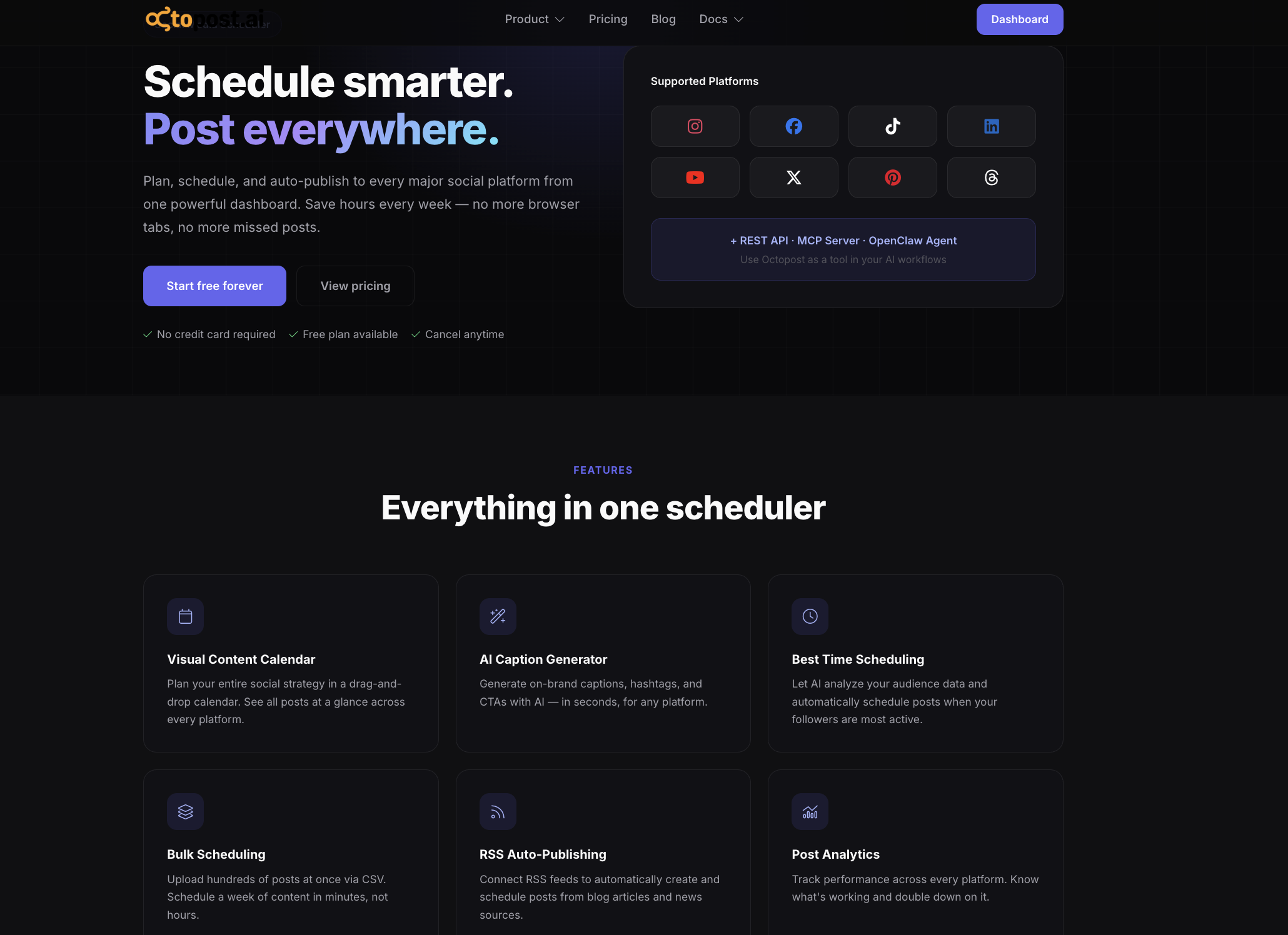
Octopost is built for teams that need structure across their entire social media process. While many tools focus on scheduling, Octopost connects planning, publishing, and performance into a single system.
It is particularly suited for teams that manage multiple campaigns, platforms, and contributors, where consistency and coordination are critical.
Octopost standout features
-
Multi-platform publishing across major channels: Schedule and publish content across LinkedIn, Facebook, Instagram, TikTok, X, YouTube, Pinterest, and Threads from one dashboard. This reduces the need to switch between tools and keeps execution centralized.
-
Centralized content calendar for high-volume planning: The visual calendar allows teams to plan, adjust, and manage large volumes of content across multiple channels. Posts can be reorganized quickly without disrupting the overall schedule.
-
Campaign-level content organization: Instead of handling posts individually, Octopost lets teams group content by campaign. This keeps messaging aligned across channels and ensures posts support larger marketing goals.
-
Bulk scheduling and content import: Upload and schedule large batches of posts using CSV import or internal tools. This is useful for teams planning weeks or months of content in advance.
-
AI-powered content creation and optimization: Generate captions, variations, and ideas directly within the platform. AI tools help maintain consistency and reduce time spent on repetitive content creation.
-
Cross-channel analytics and performance tracking: Track engagement, growth, and performance across platforms from one place. Insights help teams refine their scheduling and content strategy based on actual results.
-
Media library and asset management: Store, organize, and reuse images and videos within the platform. This keeps content accessible and reduces time spent searching for assets.
-
Reliable integrations and infrastructure: Maintain stable connections across platforms with minimal interruptions. This is critical for teams managing multiple accounts at scale.
Pricing overview
-
Free plan:
-
3 social accounts
-
100 posts per month
-
1,000 MB storage
-
Basic scheduling and publishing
-
Image editor and Facebook insights
-
Paid plans (Creator, Business, Agency):
-
10 to 200+ social accounts
-
Higher or unlimited scheduling capacity
-
Bulk scheduling and RSS auto-posting
-
Advanced analytics across platforms
-
Team collaboration and role management
-
Increased storage (up to 20,000 MB)
-
Priority support
This structure allows teams to start simple and expand without changing tools as their workflow grows.
Why Octopost stands out
Most scheduling platforms focus on one part of the process, such as posting or analytics. Octopost brings these elements together into a single workflow:
-
Plan content → schedule posts → track performance → optimize strategy
This makes it more than a scheduling tool. It becomes a system that supports how teams manage content across campaigns and channels.
Takeaway
Octopost is a strong choice for teams that need to move beyond basic scheduling and build a scalable content workflow. It provides the structure required to manage campaigns, coordinate across platforms, and improve performance over time without adding complexity.
Buffer
Best for: individuals and small teams that want simple, reliable scheduling

Buffer is one of the most accessible social media scheduling platforms, designed to help users plan and publish content without complexity. It focuses on ease of use, making it a common starting point for teams moving away from manual posting.
The platform is built around a queue-based system. You set posting times, add content to the queue, and Buffer handles publishing automatically.
Buffer standout features
-
Queue-based scheduling: Set a posting schedule once and let content publish automatically over time.
-
Multi-channel publishing: Manage platforms like Instagram, LinkedIn, Facebook, and X from a single dashboard.
-
Clean and simple interface: Easy to set up and use without a learning curve.
-
Basic analytics: Track engagement metrics such as clicks, likes, and shares.
-
Browser extension: Quickly add content to your schedule while browsing.
Pricing: Buffer offers a free plan with up to 3 social channels and 10 scheduled posts per channel. Paid plans scale based on the number of channels and features.
Drawbacks: Limited collaboration features, restricted scheduling capacity on the free plan, and not designed for complex campaign workflows.
Takeaway: Buffer is a good fit for maintaining consistency with minimal setup. It works well for simple workflows, but may feel limiting as content operations grow.
Metricool

Best for: marketers who want scheduling combined with strong performance insights
Metricool is a platform that combines content scheduling with analytics, making it suitable for users who want to improve results based on data rather than just automate posting.
It provides a unified dashboard where you can plan content and monitor performance across multiple channels.
Metricool standout features
-
Multi-platform scheduling: Plan and publish content across platforms such as Instagram, Facebook, LinkedIn, TikTok, and more.
-
Integrated analytics dashboard: Track engagement, reach, and growth metrics in one place.
-
Competitor tracking: Monitor competitor activity to benchmark your performance.
-
Best-time posting suggestions: Use data to schedule posts when your audience is most active.
-
Ad tracking support: Analyze both organic and paid performance in the same interface.
Pricing: Metricool offers a free plan for managing one brand with limited scheduling. Paid plans expand features, brands, and analytics depth.
Drawbacks: Limited collaboration features and less structured workflow management for teams.
Takeaway: Metricool is a strong option if your priority is improving performance through analytics. It goes beyond basic scheduling but is less focused on team collaboration and campaign workflows.
Later

Best for: brands and creators focused on visual content planning
Later is designed around a visual-first workflow, which makes it a strong choice for platforms like Instagram, TikTok, and Pinterest. Instead of focusing only on scheduling, it helps users see how their content will look before it goes live.
The platform combines a visual calendar with a media library, making it easier to organize assets and maintain a consistent feed.
Later standout features
-
Visual content calendar: Drag-and-drop scheduling with a preview of how posts will appear on each platform.
-
Media library: Store and organize images and videos for easy reuse.
-
Multi-platform support: Manage Instagram, TikTok, Pinterest, Facebook, and LinkedIn from one place.
-
Link in bio tool: Create a landing page to drive traffic from social profiles.
-
Basic analytics: Track engagement and performance across posts.
Pricing: Later offers a free plan with limited posts per profile. Paid plans expand scheduling capacity, analytics, and the number of managed accounts.
Drawbacks: Limited collaboration features and not designed for complex campaign workflows.
Takeaway: Later is ideal for visual content planning and maintaining feed consistency, but may not fully support team-based or performance-driven workflows.
Planable

Best for: teams and agencies that need structured content review and approval
Planable focuses on collaboration rather than just scheduling. It is built for teams that need to create, review, and approve content before it goes live, especially when multiple stakeholders are involved.
The platform provides a visual workspace where posts can be previewed exactly as they will appear on each platform.
Planable standout features
-
Visual content calendar with multiple views: Grid, feed, calendar, and list views help teams switch between planning and detailed editing.
-
Real-time collaboration and feedback: Comments, edits, and approvals happen directly on posts.
-
External approval workflows: Clients or stakeholders can review and approve content without needing full access.
-
Custom approval stages: Set up multi-step workflows for different teams or roles.
-
Cross-channel analytics: Track performance across platforms in one dashboard.
Pricing: Planable offers paid plans starting at around $33 per workspace per month, with pricing scaling based on team size and usage.
Drawbacks: Less focus on automation and performance tracking compared to platforms built for scaling workflows.
Takeaway: Planable is a strong choice for teams that prioritize collaboration and approvals. It improves workflow coordination but is less focused on automation at scale.
Vista Social

Best for: users who want a flexible tool that can scale beyond basic scheduling
Vista Social is a more flexible platform that combines scheduling, content organization, and multi-channel management. It is designed to handle growing workflows without requiring an immediate switch to a more complex system.
The platform supports a wide range of social networks and provides tools to manage content efficiently.
Vista Social standout features
-
Broad multi-platform support: Schedule and publish across LinkedIn, Instagram, Facebook, X, Reddit, YouTube, and more.
-
Centralized media library: Store and manage assets for easier planning and reuse.
-
Content calendar view: Visualize and adjust scheduled posts across channels.
-
Cross-platform publishing: Adapt content for different platforms within one workflow.
-
Basic engagement tracking: Monitor performance across channels.
Pricing: Vista Social offers a free plan with limited profiles and post caps. Paid plans expand access to more accounts, features, and analytics.
Drawbacks: Limited collaboration features on lower tiers and less advanced analytics compared to enterprise-level platforms.
Takeaway: Vista Social is a solid option for users who want more flexibility than basic tools. It supports multi-channel workflows but may require upgrading for advanced collaboration and performance tracking.
Zoho Social

Best for: single-brand teams that need high-volume scheduling without limits
Zoho Social stands out by removing one of the most common restrictions in free tools: post caps. It allows users to schedule a large volume of content in advance, which is useful for teams planning weeks or months ahead.
The platform is built around a clean calendar interface, making it easy to organize and adjust content across channels.
Zoho Social standout features
-
Unlimited post scheduling: Plan and publish content without worrying about monthly caps.
-
Multi-channel management for one brand: Manage platforms like Facebook, Instagram, LinkedIn, and X in one workspace.
-
Content calendar and planning tools: Visualize and reorganize your schedule quickly.
-
Browser extension for quick publishing: Share content directly while browsing.
Pricing: Zoho Social offers a free plan for one brand with multiple channels. Paid plans expand collaboration, analytics, and account limits.
Drawbacks: Limited collaboration features on the free plan and not ideal for managing multiple brands.
Takeaway: Zoho Social is a strong choice for high-volume scheduling within a single brand, but less suitable for multi-team or multi-brand workflows.
Publer
Best for: users who want more flexibility than basic schedulers without added complexity
Publer offers a balance between simplicity and functionality. It provides more features than entry-level tools while remaining easy to use.
The platform supports content planning, scheduling, and basic asset management in one place.
Publer standout features
-
Multi-platform scheduling: Manage content across major social networks from a single dashboard.
-
Drafts and content storage: Save and organize posts before scheduling.
-
Link in bio feature: Create a simple landing page to support social traffic.
-
Basic media editing tools: Make quick adjustments to visuals without leaving the platform.
Pricing: Publer offers a free plan with limited accounts and post caps. Paid plans unlock more scheduling capacity, analytics, and features.
Drawbacks: Limited advanced analytics and collaboration features for larger teams.
Takeaway: Publer is a good step up from basic tools. It offers more flexibility while remaining easy to manage, but may not support complex workflows at scale.
CoSchedule

Best for: content marketers who want to manage social posts alongside other content
CoSchedule is built around a unified marketing calendar. Instead of focusing only on social media, it helps teams manage blogs, emails, and campaigns in one place.
This makes it useful for teams that want to connect social media with broader content planning.
CoSchedule standout features
-
Unified marketing calendar: Plan social posts alongside blogs, emails, and other content types.
-
Drag-and-drop scheduling: Adjust timelines quickly without rebuilding your schedule.
-
Best-time scheduling suggestions: Optimize posting times based on audience behavior.
-
AI content assistant: Generate ideas and improve captions.
Pricing: CoSchedule offers a free plan with limited social profiles and scheduled messages. Paid plans expand features and integrations.
Drawbacks: Limited multi-platform support on lower tiers and less focus on social-specific analytics.
Takeaway: CoSchedule works well for content-driven teams that want a centralized calendar. It is less focused on advanced social media workflows.
Meta Business Suite
Best for: businesses focused only on Facebook and Instagram

Meta Business Suite is the native scheduling platform for Meta channels. It provides direct access to publishing features on Facebook and Instagram without requiring third-party tools.
Because it is built by Meta, it offers deeper integration with these platforms.
Meta Business Suite standout features
-
Native scheduling for Facebook and Instagram: Publish posts, Stories, and Reels directly without API limitations.
-
Unified content calendar: Manage all Meta content from one dashboard.
-
Built-in platform features: Access native tools such as post variations and audience targeting.
-
Performance insights: Track engagement and audience metrics directly from Meta.
Pricing: Meta Business Suite is completely free to use.
Drawbacks: Limited to Meta platforms only, with no support for other social channels.
Takeaway: Meta Business Suite is ideal if your strategy is focused on Facebook and Instagram. For multi-channel workflows, it needs to be combined with other tools.
How to Choose the Right Social Media Scheduling Platform
Choosing the right social media scheduling platform depends on how your workflow operates today and how it is expected to grow. The goal is not to find the tool with the most features, but the one that removes friction from your current process.
Start by identifying where your workflow slows down. In most cases, the issue is not scheduling itself, but how content is planned, coordinated, and measured across channels.
Here are the key factors to consider:
-
Number of platforms you manage: If you are posting across multiple channels, you need a platform that supports all of them in one place. Splitting your workflow across tools reduces efficiency.
-
Content volume and planning horizon: Teams that plan content weekly or monthly need a platform that can handle large volumes without strict limits or constant manual updates.
-
Team collaboration requirements: If multiple people are involved, look for tools with role assignment, approval workflows, and shared visibility. This prevents delays and keeps content aligned.
-
Analytics and performance tracking: Basic metrics may be enough at the start, but growing teams often need deeper insights to improve results and connect content with outcomes.
-
Scalability: Consider how the platform will perform as your content operations expand. A tool that works for a small setup may not support larger campaigns or teams.
The right platform should simplify your workflow, not force you to adapt to its limitations.
Conclusion
Social media scheduling platforms help businesses move from manual posting to a more structured and efficient workflow.
They allow teams to plan content in advance, stay consistent across channels, and reduce the time spent on repetitive tasks. As content operations grow, these platforms also provide the structure needed to manage campaigns, collaborate effectively, and track performance.
Each platform serves a different purpose. Some are designed for simplicity, while others support more complex workflows. The right choice depends on your current needs and how your team plans to scale.
FAQs
Are there free social media scheduling platforms?
Yes, many platforms offer free plans with basic scheduling features. These typically include limited accounts and post caps. Free plans are useful for getting started, but often lack advanced analytics and collaboration features.
Which social media scheduling platform is best for teams?
Teams benefit from platforms that support collaboration, approval workflows, and multi-channel coordination. Tools like Octopost and Planable provide more structured environments for team workflows.
How far in advance should I schedule social media content?
Most businesses plan content one to four weeks in advance. This helps maintain consistency while allowing flexibility for changes. Larger campaigns may require longer planning timelines.
Related Articles

9+ Best Social Media Posting Manager Platforms for Teams in 2026
·
29 May 2026
·
22 min read

9+ Best Apps to Schedule Social Media Posts for Smarter Team Workflows in 2026
·
25 May 2026
·
16 min read

10+ Social Media Management Tools: Which One Actually Fits Your Workflow in 2026
·
23 May 2026
·
22 min read